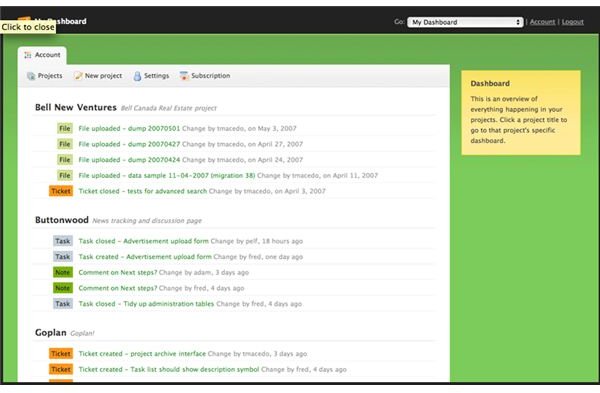
Project management software should offer an effective tool to open, progress, and close a project with efficiency and ease. Unfortunately, GoPlan Project Resource Tracking and Management program falls short for most professional project managers.
GoPlan Falls Short In Quality
Project management software should offer an effective tool to open, progress, and close a project with efficiency and ease. This tool should be user-friendly and have a grasp on the day-to-day operations of a project management team. Unfortunately, GoPlan Project Resource Tracking and Management program falls short in offering a quality product.
In reviewing GoPlan’s forum, I noticed very few entries and even fewer responses to those entries. It is somewhat of a ghost town in GoPlan’s Online Community. Posts are outdated and questions have gone unanswered that is makes me feel as if the developers have deserted the project.
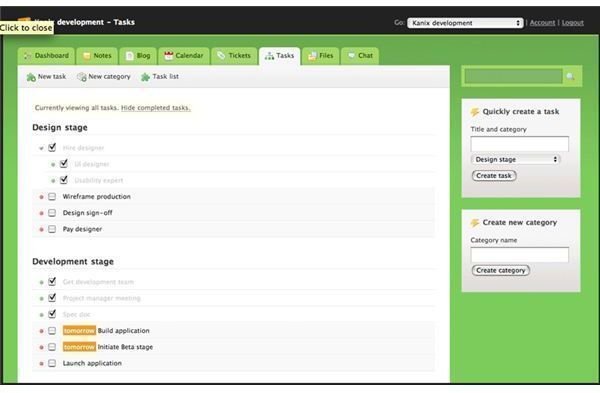
Features such as ‘Chat’ are nice for some self-contained groups. However, most project managers already use Yahoo! or AIM. The blog is simple, which it should be, and allows you to link within the site, i.e. to the calendar. This is a nice feature as daily tasks can be noted on the blog for the team to review. GoPlan offers a Ticket feature, which is nothing more than a task other than it allows you to label it as severe or critical. I do not see the need for ticketing, since a typical ticket will end up being a task anyway. I feel it is just one more step to use in moving the project forward to completion.
Pricing plans start at $10 per month for a personal plan. This plan allows up to 12 projects and carries all of the features that the larger plans offer just in a small package. The most expensive plan costs $100 per month and offers unlimited projects, unlimited users, and much more storage space. GoPlan offers a free plan that allows 2 projects. Unlike many of GoPlan’s competitors, the free plan is extremely limited and does not afford the opportunity to thoroughly assess the program.
Considering GoPlan’s competitors for online project management, I am disappointed in what GoPlan offers to its subscribers and. I recommend that GoPlan’s developers go back to the drawing board and start over. Too many other online project management programs compete for our business with more robust feature sets. GoPlan simply falls short in offering a quality and effective tool for the busy project management team.