A description of Assignment Contouring in Microsoft Project.
Presenting a slightly different option for rescheduling your resources from leveling is assignment contouring. Assignment contouring is a method by which you can adjust the number of hours in a day that a resource is assigned to work. Essentially, with assignment contouring, you have more flexibility in scheduling your resources on overlapping tasks without running the risk of entering into an overallocation situation.
The types of contouring available within Project are listed below.
Flat - The default scheduling contour and the setting that evenly allocates the number of work hours across a set duration.
Back Loaded - Assigns more hours to each day from the start to the finish of a task.
Front Loaded - Assigns fewer hours to each day from the start to the finish of a task.
Double Peak - Increases the hours scheduled per day from the start to the end of the task, excluding the first day the task is scheduled. Includes a peak near the beginning and the end of the task.
Early Peak - Increases the hours scheduled per day from the start to the end of the task , excluding the first day the task is scheduled. Includes a peak near the beginning of the task and then decreases the hours scheduled per day until the end of the task.
Late Peak - Increases the hours scheduled per day from the finish to the start of the task, excluding the last day the task is scheduled.
Bell - Often causing a task’s duration to double, this contour schedules work to peak in the middle.
Turtle - Working just like the Bell contour, this contour schedules work to peak in the middle. However, more full-time work days are scheduled to minimize the impact on the schedule duration.
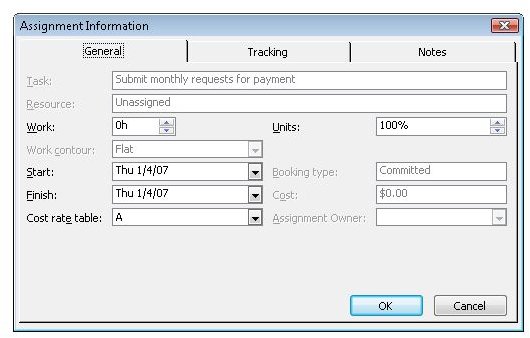
You manage assignment contours in the Assignment Information dialog box, shown in Figure below, which you can access from either Task Usage or Resource Usage view.
Images
Excerpted from…
With permission from Microsoft Press, this article content was excerpted from the book, Managing Projects with Microsoft Office Project 2007 (Self-Paced Training Kit for Exam 70-632) .